
Manage Links
Completion requirements
Access Single Use Links
Single-use links can be exported from Manage Candidates*. Single Use Links will be displayed as Unnamed Candidates.

- Select Link to access a link directly.
- If you are supervising the candidate’s assessments select Start Now.(Only Verify1.0 assessments need to be supervised)
- Select Export Links to download an Excel spreadsheet with all links.

NOTE: Each of these links will take on the identity of the individual as they register.
Access Multiple Use links
Multi-use links can be retrieved from the Add Candidates section and made available to candidates.
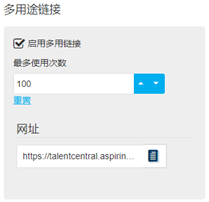
NOTE: Once candidates register using the multi-use link, they will appear on the project.