
Publish Project
Completion requirements
Once all necessary sections have been completed you can publish your project by clicking Create Project from either the top right or bottom right-hand side of the page.

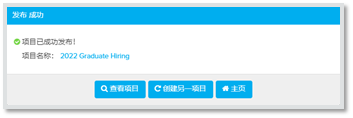
A notification window will appear when the project has been successfully published. This will give you the options to return to the created project, create another one, or visit your homepage.
All candidates who were added individually to the project or uploaded using the bulk upload feature will automatically receive an invitation with instructions on how to register and take the assessments.
Next you can retrieve single-use links and multi-use link.