
Basic Settings
Basic Settings
Expand Basic Settings. Mandatory fields are marked with an asterisk(*).
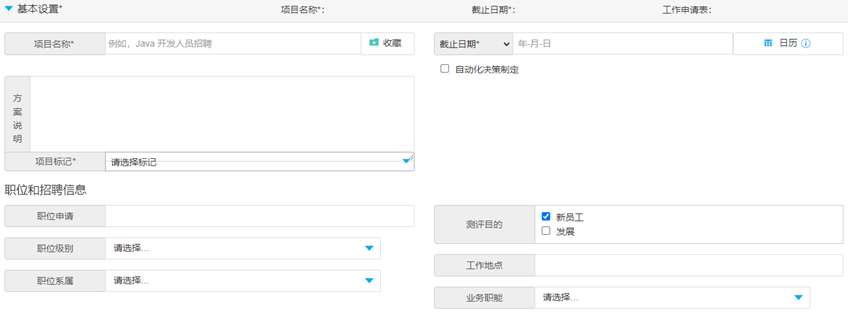
Project Name*
Enter a name to identify the project.(Candidates will not be able to see the name)
Favorite
Click Favorite for direct access to this project from the homepage.
Project Description
Enter any additional information about the project (Candidates will not be able to see the description).
Deadline Date/Days for Completion*
Select the more appropriate option for your project.
Deadline Date:A fixed date by which all candidates will have to complete assessments. When deadline expires, project can only be reused if deadline date is updated.
Days for Completion:All candidates get the same number of days to complete assessments. Project does not expire.
Application Form
Use the application form to gather additional information from candidates during registration. Click Preview to view the information that will be gathered from the candidate.
TIPS: Speak to your Account Manager about having the function enabled or tailored.
Project Tags*
Used to Track costs and monitor general activity using tags. Select a tag relevant to the project.
Tags available on your system will differ per organisation and will depend on how you wish to categorise usage. Tags can be created by the Company Super User.
IMPORTANT: If your company has bought a Solution, you will need to select the relevant Solution tag for the project you are setting up. You will also need to select any other tags that may be marked as required.
Automated Decision Making
When selected, candidates will be asked to agree to an additional section of the DPN when accessing TalentCentral (a mandatory tick box) and will see an additional paragraph within the main DPN:

Basic settings of a Volume Recruitment Project
Expand Basic Settings and name the project. Mandatory fields are marked with an asterisk(*).
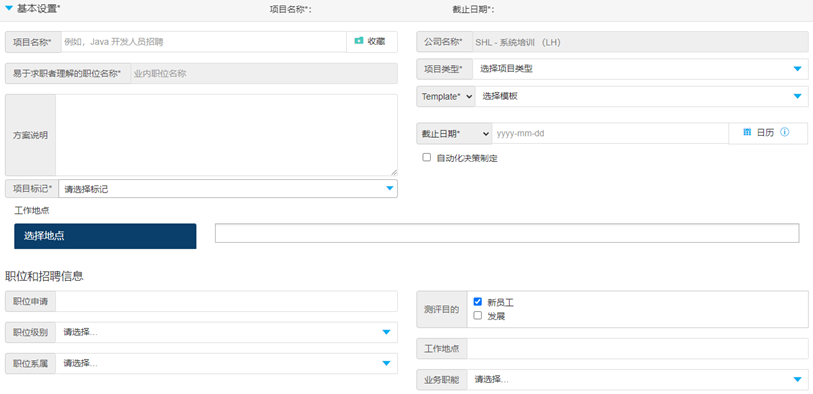
Project Type*
Select Normal from the dropdown.
VR Template*
Choose your customised workflow.
Choose Locations
The candidates can then choose which location(s) they want to apply for when they start their assessments. Select the options that you would like to make available to candidates.